Start with results, not buzzwords
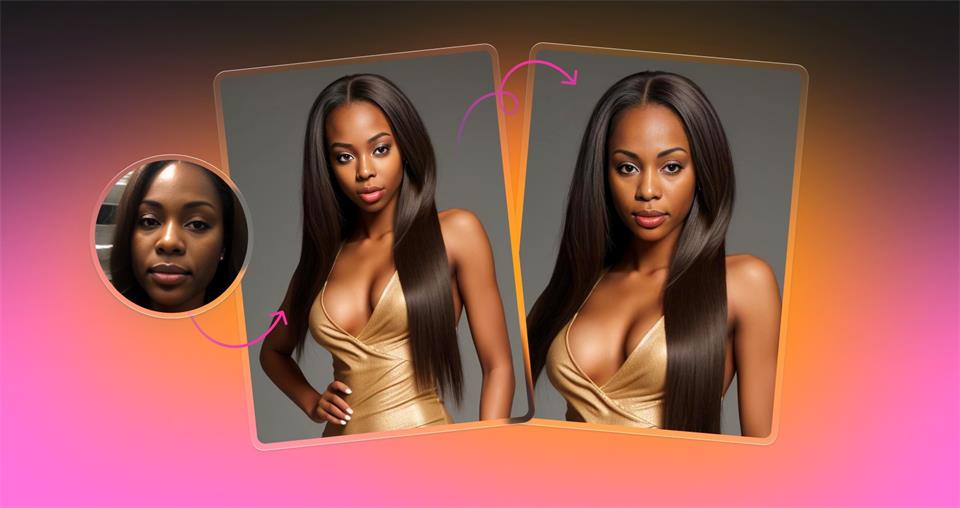
You open a photo. You mark a face. You supply another face. The output keeps the original pose, light, and camera geometry while switching identity in a way that survives normal viewing on a phone, a laptop, and a projector. The service runs in a browser and on iOS.
There is nothing to install. No drivers. No machine that only one teammate can use. Anyone can try a version during a review and get feedback in the same hour.
The system detects several faces in one frame. You can replace one subject or many during a single run. Batch processing repeats one donor across a folder of targets so the same character appears consistently across banners, decks, tutorial screenshots, and store listings.
A built in donor gallery helps you find a match for angle and light without hunting across stock sites. Account history makes it easy to compare attempts and restore an older result when the direction pivots.
Where it sits in a real pipeline
Design teams use the tool between the first art direction pass and the go or no go on a reshoot. It answers whether a layout reads better with a different age, skin tone, or hairline before budget leaves the account. Illustrators use a swapped photo as scaffolding for structure, then draw over it and keep proportions stable across a series.
Marketers localize hero images for specific regions and run split tests where persona is the only variable. Content managers anonymize case studies while preserving the real scene. Photographers deliver two or three credible alternates when talent cannot return.
App teams wrap the browser flow in a small internal utility that turns folders of inputs into approved outputs on a schedule. This is not a side toy. It is a production step.
How the output holds up
With decent inputs the results look right at common delivery sizes for web, store, and slide decks. Moderate turns of the head are fine. Even frontal light is handled well. Groups of two to four people are practical.
Artifacts show up in predictable places. Hairlines may need a short cleanup. Thin glasses frames can show a fringe. Strong backlight and very heavy makeup can reveal a seam. Motion blur and extreme angles reduce credibility. Match donor and target for pose and key light and your success rate rises fast.
The technical core in plain language
Tools in this class follow a similar path. A model finds faces and landmarks. Source and target are aligned to a common reference. Identity is transferred while pose and expression from the target stay in place. Tone and edges are blended so the inserted face sits inside the scene.
Research such as ArcFace presented at CVPR 2019 describes identity embeddings that separate who from how they are posed. Icons8 does not publish internals, which is normal for a commercial service. For buyers the important points are repeatable quality, obvious limits, and batch control.
Try a quick pass while you read
If you want a hands on check with your own files, run a small trial on face swap ai. Use a head and shoulders image with even light and a neutral angle for donor and target. Skip heavy compression for the first pass. You will know in well under a minute whether the baseline meets your bar.
Strengths that matter under a deadline
Speed across the whole team. Because it runs in the browser and on iOS, anyone can test an idea during a call and share the image right away.
Several faces in one go. Group photos stop turning into tedious masking. You can change one person or many and leave the rest alone.
Consistency across a batch. One donor can carry across a folder of targets so a single persona reads as the same person in every placement. Brand story stays coherent across hero images, promo tiles, and help center screenshots.
A curated donor gallery. Angle and light are controlled which cuts color mismatch and lens artifacts that normally give away a composite.
Retrievable history. Past outputs are easy to bring back when a parked direction becomes the winner.
Constraints you should plan for
The tool does not fix bad light in a capture. It will not open a closed eye. It is not a full retouch suite. Plan to tidy hairlines and edges around glasses on images that go wide. For large print check at full zoom and add a small amount of grain or micro contrast so the swapped area sits next to studio work without drawing attention.
Failure cases follow a clear pattern. Very oblique head angles. Motion blur. Occlusions from hands. Harsh backlights. Each one raises the probability of visible seams. If you control pose and light at the input you avoid most of it. When inputs are not controllable, set a house rule for what ships and what gets reworked.
Role based playbooks with specific moves
Designers can answer a hard question quickly. Does this concept read better with a different persona. Swap two or three versions inside the same layout and pick the strongest read without a reshoot. For campaign work build a batch that covers all placements. Keep type and color locked. Let persona vary. Review side by side and choose.
Illustrators treat a swapped photo like a scaffold. It gives bone structure and alignment of features. Draw over it, hide the layer, and keep form consistent across a series. Time moves from fixing proportions to line and style.
Design students can run a lab that actually teaches perception. Use five targets that cover a studio portrait, an environmental shot, a group, a stock image, and a phone selfie. Pick three donors that differ by age and skin tone.
Swap across all combinations. Review at one hundred percent for edges and color and at normal size for believability. Write down where seams show and why.
Marketers and content managers get clean tests and safe anonymization. Start with one hero where copy and layout stay identical. Change only persona, run a split, and measure click through and completion. For help content that shows real people, swap the face and keep the workflow visible so the scene stays honest.
Business stakeholders get faster evidence. Ask for a swapped comp before signing off on a reshoot. Weak ideas fall earlier. Budget stays with the strong direction.
Photographers keep clients moving when talent is not available. Produce two or three credible alternates for review. When the client picks a direction, finish with standard retouch polish. The tool does not replace light and expression. It lets you show options quickly.
App developers can connect the service to an internal script. Build a small utility that accepts a folder of targets, one donor, and an approval checklist. Validate minimum resolution and acceptable head angle at input. Store outputs with access logs. Add a single human accept or reject step for stability without building a full computer vision stack.
General users should follow two rules. Use photos you have the right to edit. Disclose edits where identity matters. Clear rights and clear context prevent most trouble.
Privacy and governance that match production reality
Icons8 states that uploaded images are used to perform the requested processing and that user images are not shared or showcased. Accounts include controls to clear history. On iOS images are uploaded for processing and results return to the device.
Treat these defaults as a strong baseline. If you work in a regulated field add a retention rule, access logging, and a short approval step before publication. Map the practice to a recognized framework so it survives handoffs and audits.
A bench that tells the truth about your pipeline
Run a small bench that looks like your actual work. Five targets are enough. Include one studio portrait, one environmental portrait, one group, one stock image, and one phone selfie. Select three donors that differ by age and skin tone. Swap across all combinations.
Review each output at full zoom for edges and color, then at normal size for believability. Record what needed cleanup and how long it took. Set a publication threshold. For example allow three minutes of retouch per published image and none for internal comps. This keeps the review process honest and repeatable.
Practical tips that cut rework
- Match head angle within about ten degrees and keep the main light within about one stop between donor and target. This single move improves results immediately.
- Avoid low resolution sources and heavy compression.
- Keep backgrounds simple on first passes.
- Check hairlines and edges around glasses at full zoom.
- For batches normalize exposure and color temperature across the set before you swap.
Numbers from a quick internal test
Across ten targets that matched the bench above the team kept three images as is, cleaned five images in under two minutes each, and rejected two due to motion blur and extreme angle. That pattern is consistent with day to day production.
Clear stance
Face Swap AI focuses on one job and does it well. It speeds decisions, keeps comps believable, and often ships after a short tidy. Prepare inputs with care and you keep hours in the week and money in the budget. That is the metric that matters in production.